1.Inlet hopper
2.Electromagnetic vibrating plate
3.Touch screen
4.Bottles blocking electromagnetic valve
5.Convey track
6.Emergency stop
7.Circuit box
8.Adjustable feet
9.Photo-electricity sensor
10.Outlet
11.Lifter
Channel Vibration diagram
Description of all function keys on the touch screen is shown as below
1.Plug in power,turn on the power switch and the following home screen displays
note:first,this icon  is hit to the ON,so that the conveyor belt running,and then touch the right side of the start button,
01.Qty set:XXXX XXXX=1-9999(0020)
02.Bottle:XXXX XXXX=1-9999(0000)(real-time recording of bottling quantity)
Clear of number of bottle(individual clear):touch the bottle number,can be reset。
Clear of number of bottle(individual clear):touch”stop” key and then touch “Number of bottle clear” key。
03.Speed:XX XX=1-99(00)bottle/min
04.Grain count:XXXX XXXX=1-9999(0000)
Clear of Count (individual clear):touch”stop” key and then touch “Number of bottle clear” key。
05.Start:start working
06.Stop:stop working
07.Libration +,Micro-adjustment of speed synchronously increases vibration of the first grade,the second grade。
08.Libration -,Micro-adjustment of speed synchronously reduces vibration of the first grade,the second grade。
09.Working:If the machine works in abnormal condition,indicator light is red。
10.Fault:If the machine works in abnormal condition,indicator light is on.and corresponding fault number displays.(101-108 shows there is failure in channel,for eaxmple,101 shows that there is failure in the first channel;80 shows there is failure in communications;81 shows when the warehouse stock exceeds the set value is over).
11.Bottle waiting:If there is no bag below,indicator light is red,and the machine doesn’t work;if there are bags,indicator light is green and the machine starts working.
12.Parameter, Touch”Parameter”key,the following picture frame displays
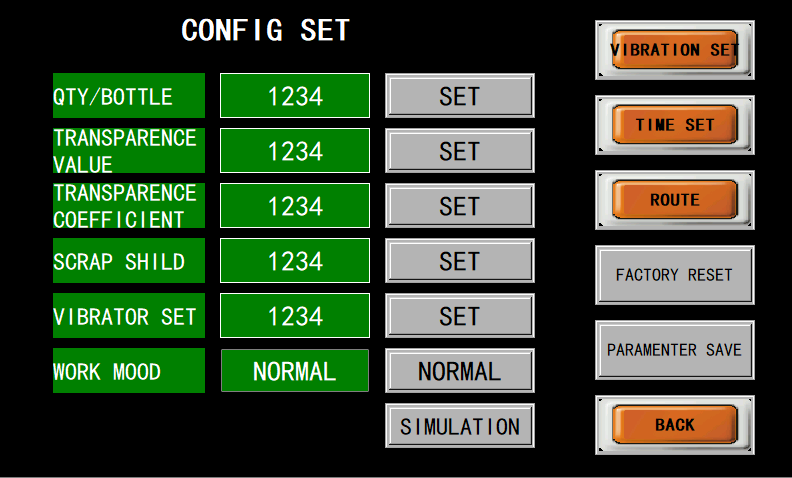
A.QTY/Bottle:XXXX XXXX=1-9999(0020) Adjust the number of bottles
B.Transparence value:XXX XXX=1-250(210) The value is used to set the maximum sensitivity of each photo-electricity eye and corresponding change in a certain range.If it is beyond the value,the alarm will remind。
C.Transparence coefficient:XX XX=1-20(1)Transparent medicine is long,and the high value should be set.The function of filtering bits for transparent medicine(Maximum filtering length is set as 001) Set 1 for the opaque medicine。
D.Scrap shield:XXX XXX=1-7(1)when the machine counts the particles,shield the medicine with particles,so the counter will not count.The value is bigger,filtered fragment length is larger.However,there is possibility for error.Close the function of transparent medicine in this condition(Set sensitivity of transparent medicine as 1)。
E.Vibrator set
Display 1:show that the particle counting is 90%,vibration becomes slow(Debugging value is 70% now)。
Display 2:show vibration didn’t becomes slow。
F.Working mode:Show whether the machine is in normal or simulated state。
F1.Normal mode:Selection mode of normal particles counting。
F2.Simulation:Select the mode in test-run of the machine to test whether all aspects can work normally。(when the counting is normal,switch form simulation of medicine prescription into normal operation mode,or the counting can’t be normal)。
G.Vibrator
Touch“Vibrato”key,the following picture frame displays:
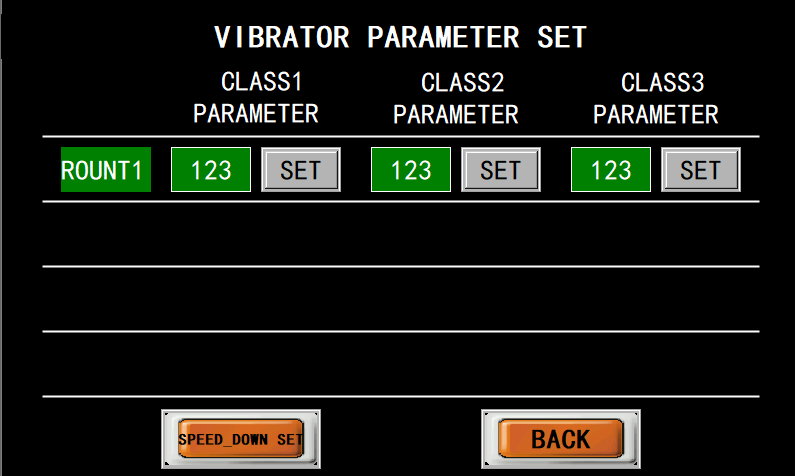
G1.1 Class 1 parameter:XXX XXX=1-100(50) Adjust the vibration of vibrator of the first grade。
2 Class 2 parameter:XXX XXX=1-100(50) Corresponding adjust the first grade of the first channel and the second channel of vibration of vibrator。
G2.Speed-down vibration parameter
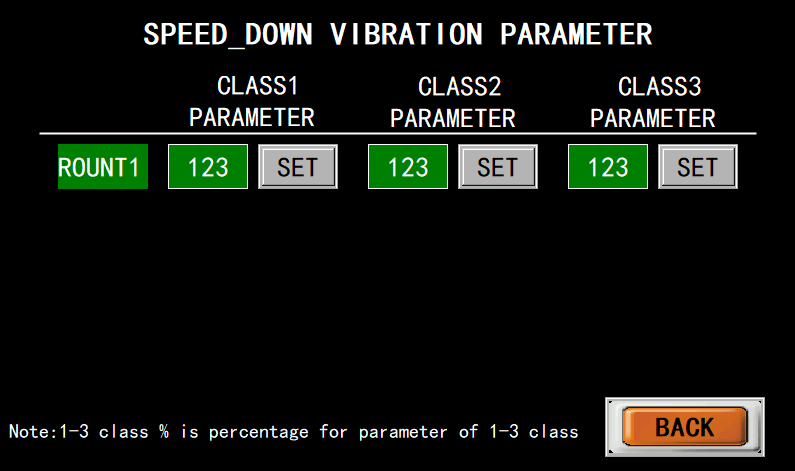
Adjust according to the percentage of normal value
H.Time set
Touch“Time set”key,the following picture frame displays:
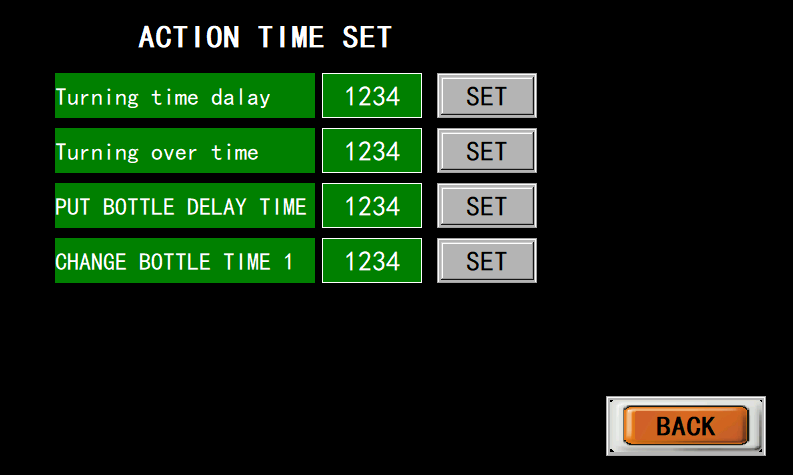
H1:Turning time delay:XXX XXX=1-100ms(035).
The time will has effect on the accuracy of bottle separation.If the medicine drops smoothly in the channel,there are many bottles in the front,which means that the value is bigger;If there is only a few bottles in the front,which means the value is smaller;In addition,if the value is inappropriate,the medicine may fall in plate turning。
H2: Turning over time:XXX XXX=1-500ms(350),Time for plate turning is also used for precise counting which should be set as proper number,shouldn’t very small.
H3: Delay time for bottle placement: XXX XXX=1-500ms (500).
The delay time is related to the diameter of the bottle, the time it takes for the cylinder to retract and the length of time for the bottle to travel (also related to the speed of the conveyor belt). If the delay time for placing the bottle is too small, it will cause one bottle to not travel, and if it is too large, multiple bottles will travel.
H4: Bottle changing action time 1: XXX XXX=0-1000ms (120)
The time it takes to place the flipping plate after the cylinder is pushed out, that is, the waiting time after counting is completed. If the time value for the bottle changing action is too small, it will cause medicine to still be in the hopper during automatic bottle changing, and if it is too large, it will slow down the overall speed.
J: Channel
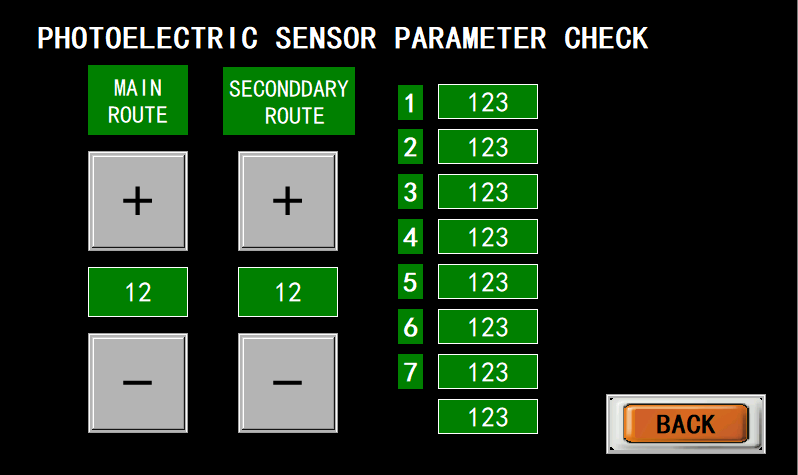
Observe the value of photo-electricity eye in the sub channel, the value displays the sensitivity of photo-electricity eye.The smaller the value is,the higher the sensitivity is。The values of each channel's optical eye can be seen through+and -。
K:Recover factory default:Touch the key to recover original factory default。
L:Save the parameter:Save the parameter after each adjustment。



 is hit to the ON,so that the conveyor belt running,and then touch the right side of the start button,


